Yesterday, I edited my all karate animations those are sold at shops in SL, and in SLEX and shop OnRez.
I changed 1, I made the priority of all animattions "4". 2, I made the permission of all animattions "modify OK".
You know, we should configure the priority of animation when we upload BVH file. Sometimes I have set it 3, because there are no problems to enjoy only watching animations. but recently, many peaple purchase my Karate animations to make weapons for combat.
In many combat sysytems, player uses arrow buttons for avator's motion. At this time, if the priority of Karate animation is low, walking motion delete the Karate animation.
So, I changed the priority "4".
And to make weapon with Karate animations, they want to change the file name. So, I made the "modify" permission OK.
I think that the karate animations became the convenient materials to make a weapon.
Hi, I am very happy, because I could complete the "Motion Plug 1.5 ". The theme was to solve malfunction, but as a result, I think "Motion Plug 1.5 " is more useful because of being unnecessary to click many dialogs when you attach it.
But the method of assigning animations to buttons is changed. I explain it in order.
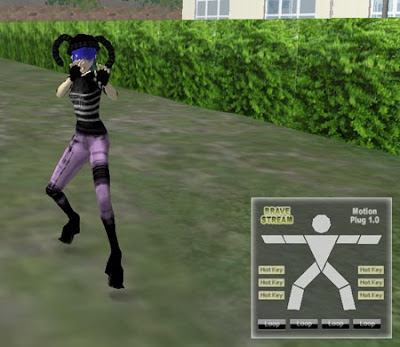
[Motion Plug] is a HUD to control the avator animation by 1 click. There is a function that the animation can be asigned to gesture and be controled by shortcut key.But the function can be used only for the animation with full permission.
Almost animations in shops are (no copy,no moddify) and they can not be asigned to gesture,so we must open them from inventory by double click and click the button ato dialog box.
[Motion Plug] is a solution for the complicatedness, and makes you enjoy animation in one click easily.I developed [Motion Plug] for my customers to enjoy my Karate animations.But [Motion Plug] can be used for all animations like dances,poses,and so on.
//// Update note ////
2007/09/05 [Motion Plug 1.0] was released. 2007/11/29 "Second Life 1.18.5 Viewer" was released, and there was a change about "Permissions dialogs".Therefore, the issue for [Motion Plug 1.0] has occured. 2007/12/08 [Motion Plug 1.5] released.
//// Changes from previous version [Motion Plug 1.0] /////
(1)It becomes not necessary to click 20 buttons of the dialog boxes. (2)All animations are stored in one root prim. (3)By filling in one script with all names of animations,you can assign all animations to buttons.
//// How to use ////
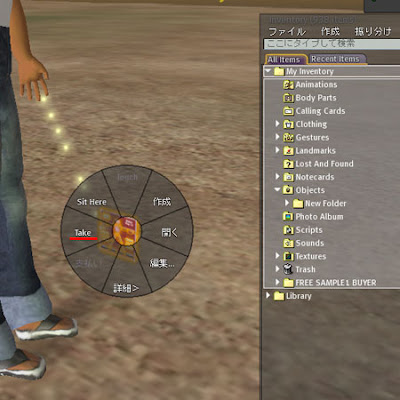
(1)Rez the object "Motion_Plug1.5_box" on the ground of sand box or your land.
(2)Right click it and open the content. (3)Put the "MotionPlug1.5" in the inventory. (4)Rez the "MotionPlug1.5" from inventory to the ground. (5)Right click the "MotionPlug1.5" and open the Content tab in the Edit menu, drag and drop all animations that you want to use into Content. (6)Double click the script "MotionPlug1.5_root" in the same Content. (7)You assign animations to a button in the list below the title //// Assign animations to buttons,here ///. For example,in the case of the first line 'string head = "animation name";' , please change "animation name" to the name of the animation you want to use.* Right-click the animation , property screen will open, select the name text , copy to the script, it's the simple way. Because character string "head" after "string" is the button name, you assign the animation to a head button in this line. * About the placement of the button name, please confirm the image "button_list" which is in "Motion_Plug1.5_box". * Put animations that are not loop animation into body parts button and hotkey button.(These buttons do't have the function to stop the loop animations) * Put loop animations(and poses) into the "Loop" buttons.("Loop" buttons have a function to stop the loop animations by second click.)
(8)When you finish writing the names of animations and save the script,close the edit menu and take "MotionPlug1.5" in your inventory.
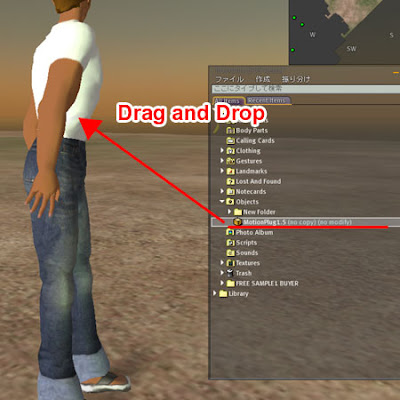
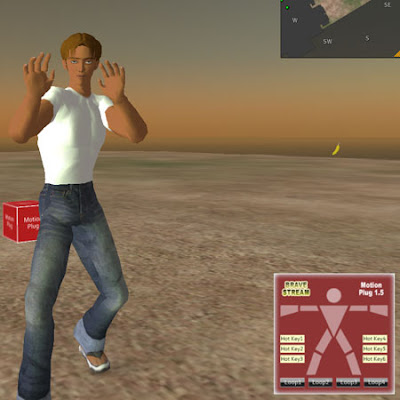
(9)Drag and drop the "MotionPlug1.5" to attach your avator. (10)Click buttons of the HUD that is in the lower right area, and please play animations.(Dialog box does not appear anymore) //// Attention ////
* [ Motion Plug Complete type A ] cannot give damege to another avators and objects. * This HUD cannot work at the place where the use of the script is set impossible. //// Group ////
I established a group to send update information from "Brave Stream". Please search the group with keyword "Brave Stream English",and push the "Join" button.
Hi, now I'm going to build a stage where anyone can enjoy karate animation for long time by loop long animation.
This space will be completed after about 2 weeks. I want a large fire at the center of the space. So, I began to make it by particle. The image below is not the space, it is my private laboratory.
I have already set up the BGM, please hear it if you have a time to go my shop.
Hi, I have completed the HUD to control animation, "Motion Plug1.0".
I am distributing it free in my shop, and I want to introduce function or how to use here. (You can go to my shop in teleport from right banners)
The video that the avator uses "Motion Plug".
///// Function ////// [Motion Plug] is a HUD to control the avator animation by 1 click. There is a function that the animation can be asigned to gesture and be controled by shortcut key.But the function can be used only for the animation with full permission.
Almost animations in shops are (no copy,no moddify) and they can not be asigned to gesture,so we must open them from inventory by double click, and click the button of dialog box.
[Motion Plug] is a solution for the complicatedness, and makes you enjoy animation in one click easily,by doing access permission at the time of wearing in a mass.I developed [Motion Plug] for my customers to enjoy my Karate animations.But [Motion Plug] can be used for all animations like dances,poses,and so on.
//// How to use //// (1)Rez the object "Motion_Plug1.0_box" on the ground of sand box or your land. (2)Right click it and open the content. (3)Put the "MotionPlug1.0" in the inventory. (4)Rez the "MotionPlug1.0" from inventory to the ground. (5)Operate a camera so that "MotionPlug1.0" is displayed greatly. (It will be easy to adjust it when you move up "MotionPlug1.0" from the ground) (6)Check the "Edit linked parts" box in the Edit menu and select the button modelled the human body parts in the "Motion_Plug1.0_box". (7)Open the Content tab in the Edit menu, drag and drop the animation that you want to use into Content. Put the animation that are not loop animation in this button and hotkey button.(These buttons do't have the function to stop the loop animations) (8)Likewise, open the Content tab of the "Loop" button, and put the loop animation such as pose in it.("Loop" buttons have a function to stop the loop animations by second click.) (9)When you finish putting the animations that you want to use,close the edit menu and take "MotionPlug1.0" in your inventory. (10)Drag and drop the "MotionPlug1.0" to attach your avator. (11)So,the blue dialog boxes will be appeared on the right upper area, click "Yes".20 dialog boxes will be appeared,please click thes entirely quickly. (12)Click buttons of the HUD that is in the lower right area, and please play animations.(Dialog box does not appear anymore) //// Attention //// The animation data are sold separately. Please put only one animation in one button. If you close a Second Life viewer with putting this HUD on, when you log in on the next time, the dialog boxes will appears.
//// Group //// I established a group to send update information from "Brave Stream". Please search the group with keyword "Brave Stream English",and push the "Join" button.
 You know, we should configure the priority of animation when we upload BVH file.

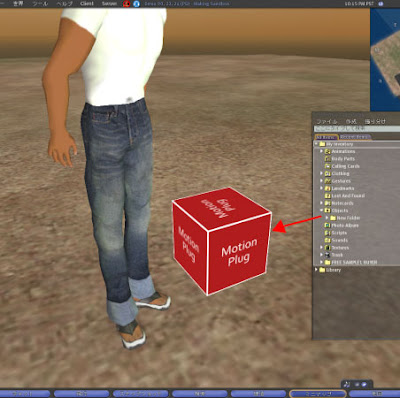 (2)Right click it and open the content.
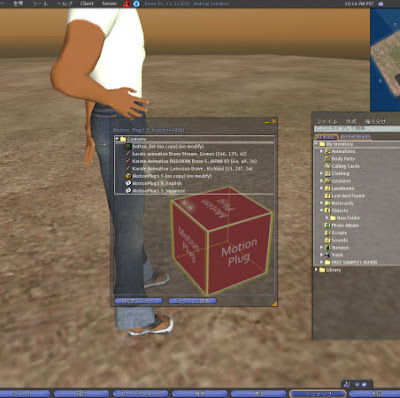 (3)Put the "MotionPlug1.5" in the inventory.
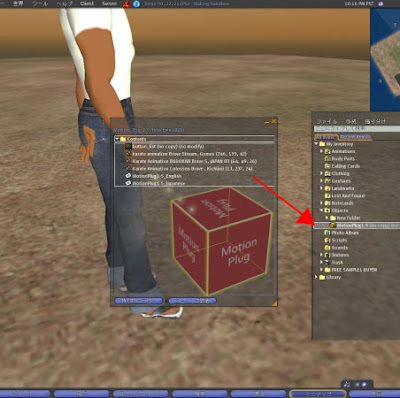 (4)Rez the "MotionPlug1.5" from inventory to the ground.
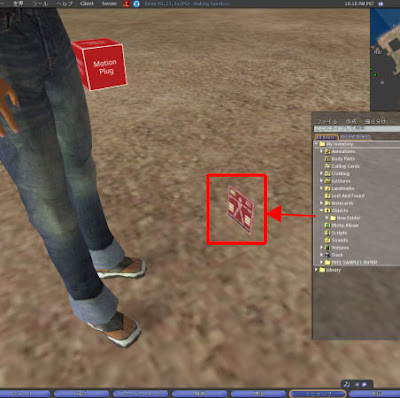 (5)Right click the "MotionPlug1.5" and open the Content tab in the Edit menu, drag and drop all animations that you want to use into Content.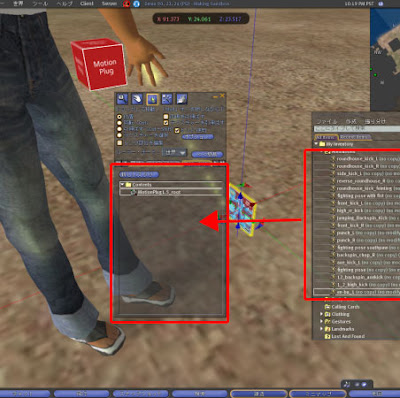
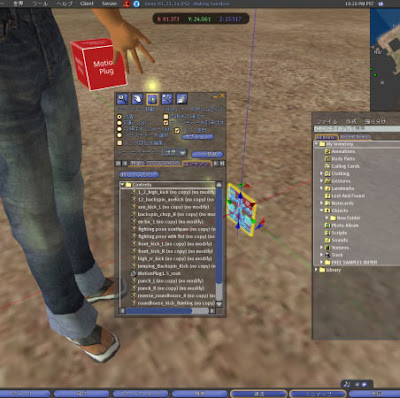 (6)Double click the script "MotionPlug1.5_root" in the same Content.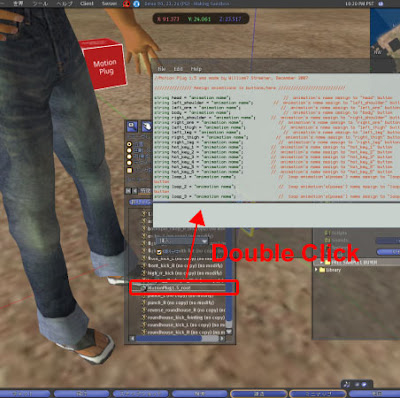
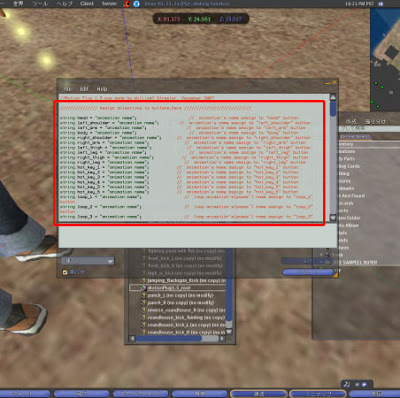 For example,in the case of the first line 'string head = "animation name";' , please change "animation name" to the name of the animation you want to use.* Right-click the animation , property screen will open, select the name text , copy to the script, it's the simple way.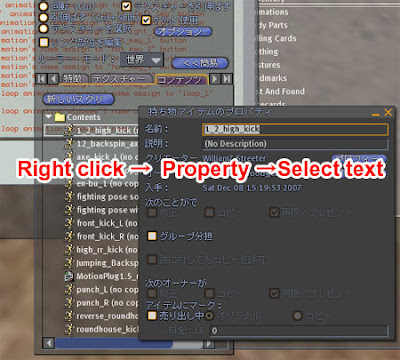
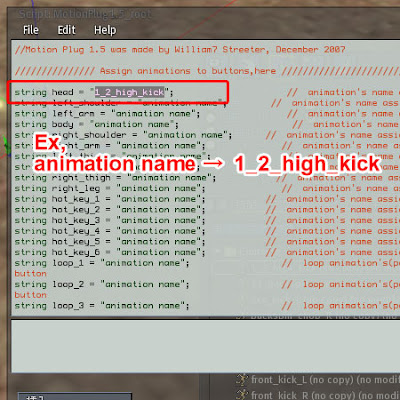 Because character string "head" after "string" is the button name, you assign the animation to a head button in this line.
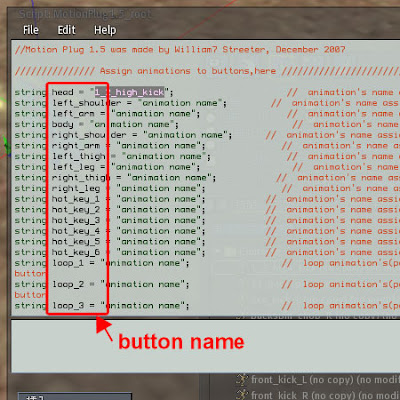 * About the placement of the button name, please confirm the image "button_list" which is in "Motion_Plug1.5_box".
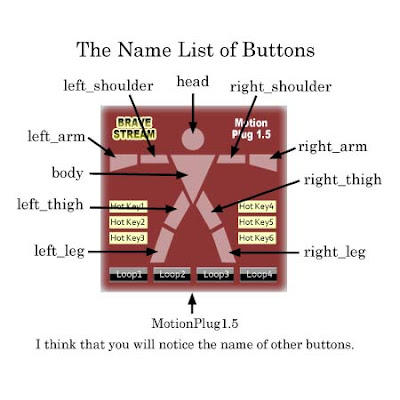 * Put animations that are not loop animation into body parts button and hotkey button.(These buttons do't have the function to stop the loop animations)
 (9)Drag and drop the "MotionPlug1.5" to attach your avator.
 (10)Click buttons of the HUD that is in the lower right area, and please play animations.(Dialog box does not appear anymore)
 //// Attention ////
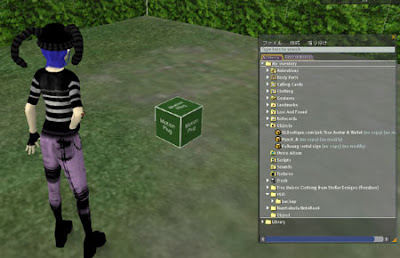 (2)Right click it and open the content.
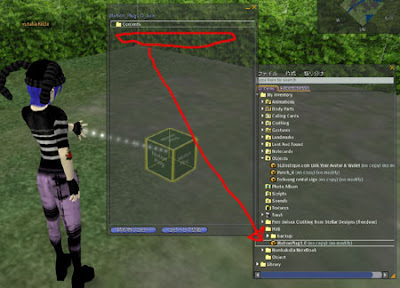 (4)Rez the "MotionPlug1.0" from inventory to the ground.
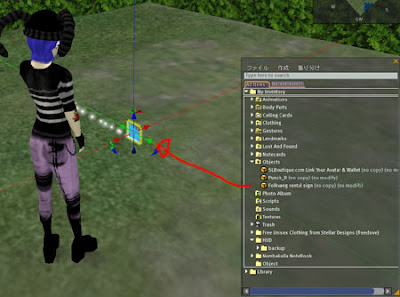 (5)Operate a camera so that "MotionPlug1.0" is displayed greatly. (It will be easy to adjust it when you move up "MotionPlug1.0" from the ground)
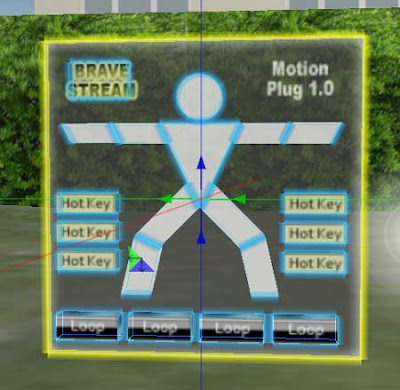 (6)Check the "Edit linked parts" box in the Edit menu and select the button modelled the human body parts in the "Motion_Plug1.0_box".
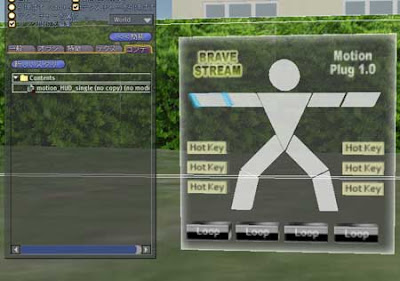 (7)Open the Content tab in the Edit menu, drag and drop the animation that you want to use into Content. Put the animation that are not loop animation in this button and hotkey button.(These buttons do't have the function to stop the loop animations)
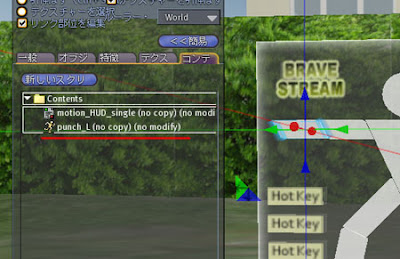 (8)Likewise, open the Content tab of the "Loop" button, and put the loop animation such as pose in it.("Loop" buttons have a function to stop the loop animations by second click.)
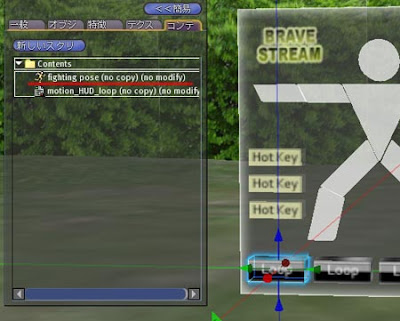 (9)When you finish putting the animations that you want to use,close the edit menu and take "MotionPlug1.0" in your inventory.
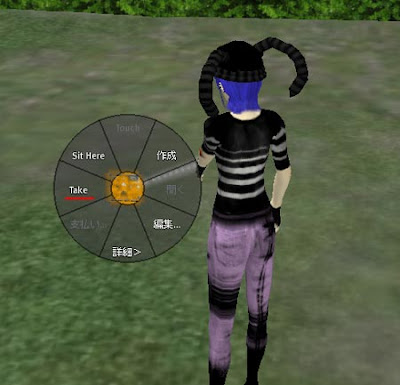 (10)Drag and drop the "MotionPlug1.0" to attach your avator.
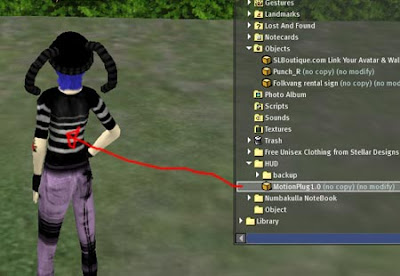 (11)So,the blue dialog boxes will be appeared on the right upper area, click "Yes".20 dialog boxes will be appeared,please click thes entirely quickly.
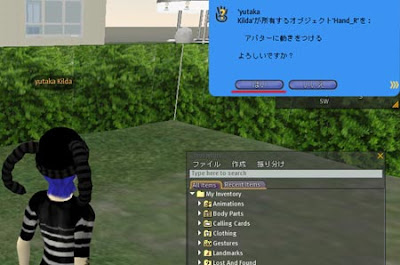 (12)Click buttons of the HUD that is in the lower right area, and please play animations.(Dialog box does not appear anymore)
 //// Attention ////