Sunday, August 1, 2010
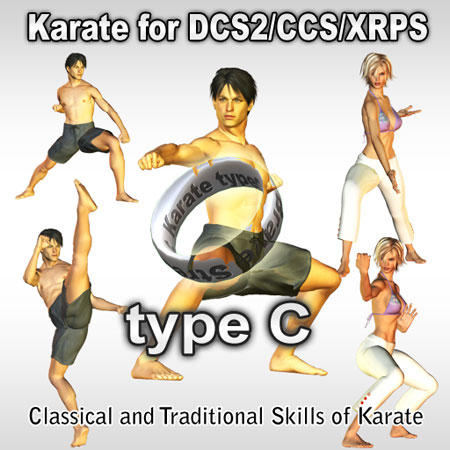
At last "typeC" was completed.
I spent about 1 year to make this, because I had been very busy in real life from last autumn to this spring.
But in June, I opened the official website, and today I released this "typeC".
I am a little happy now.
You can watch this animation by YouTube from following URL.
http://brave-stream.com/combat/weapon/karate_type_c/
The characteristic of "typeC" is composition from classical and traditional skills of karate.
When I started to learn karate, I wondered "will these skills be usable in real match?".
After that, I understood those seem not to be usable.But the interest lasted all the time.
When I tested this weapon, I thought "It is cool unexpectedly."
By the way, I set the price "L$1700", slightly low price.
I will be happy if many players use this weapon.
Wednesday, June 23, 2010
I made "Chop from the Overhead".
Brave Stream Official Website "Chop from the Overhead"
The point that I cared about is the balance of torsion condition of the upper body and the waist.
I did adjustment again many times.
I want to make some more chops.
And I will make the combat weapon that icludes many chops.
Thursday, October 15, 2009
Sounds for Karate weapon
You can change animations in "Karate Fight" weapon.
So,you can customize Karate weapon.
Not only animations but also sounds are necessarry to customize.
So, I released them in my shop.
The sounds are free.
Please use them.
http://slurl.com/secondlife/Fushida/113/9/56
Friday, September 18, 2009
Change from "WARPS" to "XRPS"

Saturday, June 6, 2009
The Update of "Karate typeS"
It is the update virsion.
This update was given to follow the rule of many combat SIMs.
The jump distance of "Reverse Roundhouse Jumping Triple Kick" and "Triangle Jump" were redused.
Customers who purchased "typeS" can exchange to "typeS 1.5".
If you want to exchange, send IM to me(William7 Streeter).
I will confirm the avatar's name.
*Give me IM from the avatar that purchased the "typeS". If a different avatar send me IM, I cannot distinguish it is real or not.
I pray for what people enjoy with my weapon.
Thank you!
Saturday, January 17, 2009
Karate for DCS,CCS,XRPS typeS
Today, I released the new weapon for combat system(DCS2, SSC, XRPS).
Two weapons that I have already released seem to be favorable receptions more and more.
The considerably luxurious skills are included in this weapon.
[2009/06/07] I released the update virsion.(ver.1.5)
[shop in SL]
http://slurl.com/secondlife/Fushida/101/13/56
[Xstreet]
http://www.xstreetsl.com/modules.php?name=Marketplace&file=item&ItemID=1141642
_/_/_/ Introduction _/_/_/
"Karate for DCS/CCS/XRPS type S" is the newest type of the Karate weapon series for combats that it has begun from February, 2008.
This is a weapon for DCS2,CCS and XRPS.
By attaching it, players can use Karate skills.
(DCS official site; http://www.dcs2.org/ )
(CCS official site; City of LOST ANGELS http://www.cityoflostangels.biz/wiki/news.php )
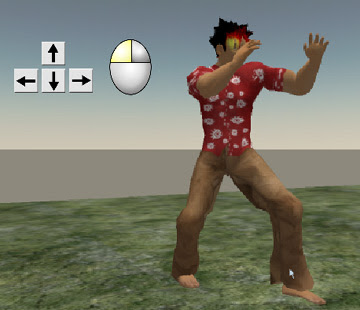
In DCS2, CCS and XRPS, players attack the opponents by pushing the arrow key (or, AWSD key) while pushing the left button of the mouse. If a timing and distance are appropriate, the player can give the opponent damage.
The player generally puts on the weapons such as a sword or the crow to fight in DCS2, CCS and XRPS.
In karate weapon which I produced, players attach the bracelet-shaped object, but they do not put on the weapon and attack the target barehanded.
_/_/_/ A characteristic of type S _/_/_/
A characteristic of "type S" is to include the skills they are the super high level that becomes the legend in Karate.
In the other types, skills used in real matches and lessons are involved.
But in "type S", the aerial skills that we can rarely watch are included abundantly.
It will be to surely give a strong impression to other players.
_/_/_/ How to use [Karate for DCS/CCS/WARPS type S] _/_/_/
(1)Rez the object "Karate_typeS_box" on the ground of sand box or your land.
(2)Right click it and open the content.
(3)Put the "Karate_typeS" in the inventory.
(4)Drag and drop the "Karate_typeS" to attach your avator.An earring object is attached to the right ear of the avatar.
(5)You can attack the opponent by pushing the arrow button while pushing the left button of the mouse.
* If an owner clicks it, the earring object will be invisible. And 2nd click make it appear.
* And the earring is modify OK, so you can change the shape and part to attach.
_/_/_/ The operation of the karate skills with arrow keys _/_/_/
With pushing the left button of the mouse, operate arrow key as follows.
() is the key which you can substitute for arrow key.
[] is a name of the animation file to be related to.
arrow keyLeft(A) ===== Combination of Left Axe Kick and Right Low Kick === [left_arrow]
Right(D)===== Right Axe Kick === [right_arrow]
Forward(W)=== Combination of Right Low, Middle, High Kick === [forward_arrow]
Back(S) ===== Jumping Reverse Roundhouse Kick === [back_arrow]
Forward(W) + Back(S) ===== Reverse Roundhouse Jumping Triple Kick == [forward_back]
Forward(W) + Left(A) ===== Combination of Left High Kick, Side Kick, and Right Punch(*) === [forward_left]
Forward(W) + Right(D) ===== Rounding Heel Kick(*) = [forward_right]
Left(A) + Right(D) ===== Triangle Jump(*) = [left_right]
Back(S) + Left(A) ===== Combination of Left Triple High Kick(*) = [back_left]
Back(S) + Right(D) ===== Combination of Backspin Low and Right High Kick(*) = [back_right]
(*)In the case of the skill to have to push 2 keys, the animation starts by the timing when you release the keys.
_/_/_/ The change of animation assigned to arrow key _/_/_/
(1)Rez the earring object," Karate_typeS " on the ground of sand box or your land.Right click it and open the content, move the animation file which you do not use to your inventory.
(2)Put the new animation file into "contents", and change the file name to the one which moved to your inventory at (1).
(You had better to write the original name of the animation file in the "description" field of property panel)
(3)After replacing, return "Karate_typeS" to your inventory, and attach it by drag & drop.
* All animation files sold in my shop "Brave Stream" are Modify OK, so you can use them to replace.
_/_/_/ The change of sound assigned to arrow key _/_/_/
Like a case to replace animation files, replace the sound file and change the file name.
_/_/_/ Permissions of each elements of this weapon _/_/_/
animation === Modify OK, Transfer OK
sound === Modify OK, Transfer OK
object === Modify OK, Transfer OK
script === Transfer OK
_/_/_/ Group _/_/_/
I established a group to send update information from "Brave Stream".
Please search the group with keyword "Brave Stream English",and push the "Join" button.
Monday, August 4, 2008
Karate for DCS/CCS type K
"Karate for DCS/CCS type K" is a new type of "Karate Fight for DCS".
<2008/08/28>
This weapon is available for WARPS , I confirmed it.
■SLEX
http://www.slexchange.com/modules.php?name=Marketplace&file=item&ItemID=827028
■ShopOnRez
http://shop.onrez.com/item/719561
It is sold in SL shop,too.(2008/08/07)
http://slurl.com/secondlife/Fushida/113/16/56
_/_/_/ Function _/_/_/
This is a weapon for DCS and CCS.
By attaching it, players can use Karate skills.
(DCS official site; http://www.dcs2.org/ )
(CCS official site; City of LOST ANGELS http://www.cityoflostangels.biz/wiki/news.php )
I introduce the DCS and CCS in my blog a little.
http://bravestream.blogspot.com/2008/02/about-dcs.html
http://bravestream.blogspot.com/2008/03/test-in-cola-for-ccs.html
In DCS and CCS, players attack the opponents by pushing the arrow key (or, AWSD key) while pushing the left button of the mouse.
If a timing and distance are appropriate, the player can give the opponent damage.
The player generally puts on the weapons such as a sword or the crow to fight in DCS and CCS.In karate weapon which I produced, players attach the bracelet-shaped object, but they do not put on the weapon and attack the target barehanded.
In this virsion "type K", there are skills that we can see in the match of K1 or Kick Boxing.
_/_/_/ How to use [Karate for DCS/CCS type K] _/_/_/
(1)Rez the object "Karate_for_DCS/CCS_typeK_box" on the ground of sand box or your land.
(2)Right click it and open the content.
(3)Put the "Karate_for_DCS/CCS_typeK" in the inventory.
(4)Drag and drop the "Karate_for_DCS/CCS_typeK" to attach your avator.An earring object is attached to the right ear of the avatar.
(5)You can attack the opponent by pushing the arrow button while pushing the left button of the mouse.
* If an owner clicks it, the earring object will be invisible. And 2nd click make it appear.
* And the earring is modify OK, so you can change the shape and part to attach.
_/_/_/ The operation of the karate skills with arrow keys _/_/_/
With pushing the left button of the mouse, operate arrow key as follows.
() is the key which you can substitute for arrow key.
arrow key
Left(A) ===== Punch Left,Right, Left Low Kick
Right(D)===== Punch Left,Right,Left, Right Low Kick
Forward(W)=== Punch Left,Left, Right Low Kick
Back(S) ===== Backspin Blow
Forward(W) + Back(S) ===== 7 Punches(*)
Forward(W) + Left(A) ===== Right Low Kick, Left High Kick(*)
Forward(W) + Right(D) ===== Left Front Kick, Right High Kick(*)
Left(A) + Right(D) ===== Jumping Double Knee Kick(*)
Back(S) + Left(A) ===== Left Knee Kick(*)
Back(S) + Right(D) ===== Right Knee Kick(*)
(*)In the case of the skill to have to push 2 keys, the animation starts by the timing when you release the keys.
_/_/_/ The change of animation assigned to arrow key _/_/_/
(1)Rez the earring object," Karate_for_DCS/CCS_typeK " on the ground of sand box or your land.Right click it and open the content, move the animation file which you do not use to your inventory.
(2)Put the new animation file into "contents", and change the file name to the one which moved to your inventory at (1).
(You had better to write the original name of the animation file in the "description" field of property panel)
(3)After replacing, return "Karate_for_DCS/CCS_typeK" to your inventory, and attach it by drag & drop.
* All animation files sold in my shop "Brave Stream" are Modify OK, so you can use them to replace.
_/_/_/ The change of sound assigned to arrow key _/_/_/
Like a case to replace animation files, replace the sound file and change the file name.
_/_/_/ Permissions of each elements of this weapon _/_/_/
animation === Modify OK, Transfer OK
sound === Modify OK, Transfer OK
object === Modify OK, Transfer OK
script === Transfer OK
_/_/_/ Group _/_/_/
I established a group to send update information from "Brave Stream".
Please search the group with keyword "Brave Stream English",and push the "Join" button.
Sunday, March 30, 2008
Test in CoLA for CCS
Some people ask me "Is it OK for CCS,too?".
I think I have to confirm it.
So, I get into CoLA.
(Lost Angels 139,98,28)
I arrived CoLA, it is below.
I got the CCS HUD, by clicking the board.
After attatching it, the HUD interface appears left side, and the value of health etc, appears above the avator.

Out of the building, there are meny combat fighters like this.

My purpose to came here is to comfirm that the "Karate Fight for DCS" is OK for CCS,too.
so, I fight with my 3rd avator at the street of CoLA.

I confirmed it is OK.
I am satisfied enough.
But CoLA is very heavy lag...
Sunday, March 16, 2008
The Karate shop for DCS user is opened.
I could not write blog and login SL, because my work in day is very busy now.
I opened the "karate for DCS 'Brave STream' ".
It is a shop for DCS users, and the karate weapons can be purchased there.
Karate for DCS "Breave Strem"Fushida (113, 16, 56)http://slurl.com/secondlife/Fushida/113/16/56There is a vendor of DCS, links to DCS sim, manual of DCS, and of course Karate weapon.
I think here is a good place, because a wonderful castle is back.Please visit if you are interested in DCS or karate.
Sunday, February 17, 2008
The weapon "Karate Fight for DCS"
I changed the permissions of sound files.(2009/05/30)
This weapon is available for WARPS , I confirmed it. (2008/08/28)
It can be used in CCS, too. (2008/03/30)
It is sold in SL shop,too.(2008/03/17)
■X street
https://www.xstreetsl.com/modules.php?name=Marketplace&file=item&ItemID=559588
I put it in a category "weapon" for the first time this time.
If a new user discovers it, I am glad.
■ YouTube movie. (There are sound effects in this movie.)
_/_/_/ Function _/_/_/
"Karate Fight for DCS" is a weapon for DCS(Dynamic Combat System ).By attaching it, players can use Karate skills.
In DCS, players attack theiar target by pushing the arrow key (or, AWSD key) while pushing the left button of the mouse.
If a timing and distance are appropriate, the player can give a target damage.
The player generally puts on the weapons such as a sword or the crow to fight in DCS.In karate weapon which I produced, players attach the bracelet-shaped object, but they do not put on the weapon and attack the target barehanded.
_/_/_/ How to use [Karate Fight for DCS] _/_/_/
(1)Rez the object "Karate_Fight_for_DCS_box" on the ground of sand box or your land.
(2)Right click it and open the content.
(3)Put the "Karate_Fight_for_DCS1.0" in the inventory.
(4)Drag and drop the "Karate_Fight_for_DCS1.0" to attach your avator.A bracelet-shaped object is attached to the right arm of the avatar.
(5)You can attack the target by pushing the arrow button while pushing the left button of the mouse.※ If an owner clicks it, the bracelet-shaped object will be invisible. And 2nd click make it appear.
_/_/_/ The operation of the karate skills with arrow keys _/_/_/With pushing the left button of the mouse, operate arrow key as follows.
() is the key which you can substitute for arrow key.
arrow keyLeft(A) ===== Left Front Kick
Right(D)===== Right Front Kick
Forward(W)=== Punch Left,Right,Left High Kick
Back(S) ===== Jumping Backspin Kick
Forward(W) + Back(S) ===== Punch Left,Right,Backspin Chop, Axe Kick
Forward(W) + Left(A) ===== Left High Kick
Forward(W) + Right(D) ===== Right High Kick
Left(A) + Right(D) ===== Left High Kick,Right Reverse Roundhouse Kick
Back(S) + Left(A) ===== Right Reverse Roundhouse Kick
Back(S) + Right(D) ===== Right High Kick,Right Jumping High Kick


_/_/_/ The change of animation assigned to arrow key _/_/_/
(1)Rez the bracelet-shaped object," Karate_Fight_for_DCS1.0 on the ground of sand box or your land.Right click it and open the content, move the animation file which you do not use to your inventory.
(2)Put the new animation file into "contents", and change the file name to the one which moved to your inventory at (1).(You had better to write the original name of the animation file in the "description" field of property panel)
(3)After replacing, return "Karate_Fight_for_DCS1.0" to your inventory, and attach it by drag & drop.
* All animation files sold in my shop "Brave Stream" are Modify OK, so you can use them to replace.
_/_/_/ The change of sound assigned to arrow key _/_/_/
Like a case to replace animation files, replace the sound file and change the file name.
_/_/_/ Permissions of each elements of this weapon _/_/_/
animation === Modify OK, Transfer OK
sound === Modify OK, Transfer OK (2009/05/30 changed)
object === Modify OK, Transfer OK
script === Transfer OK
Please try it !
Saturday, February 9, 2008
About DCS
I will show it soon, and I will make a new shop only for DCS users.
Because it seems to cause confusion when I put the tools of the different use in the same place.
DCS users, expect it and please wait.
By the way, I write about DCS today.
At first, it was an opportunity that DCS was introduced by an American man.
He said to me."You should make the Karate weapon for DCS"
I asked him."What is DCS ?"
He gave me teleport.
This plase was "DARK CITY", SIM for DCS.I knew "DCS" means "Dynamic Combat System".
The combat in "DARK CITY" was very exciting. And I made up my mind to make an karate weapon for DCS.
In DCS, members use the HUD that display numerical value such as health or the stamina.And values(strength ,concentration, etc.) also forms a line in the screen upper part.
I heard that SIMs for DCS are over 30, and over 5,000 peaple play there.DCS is not only combat system but also RPG system.So, they do not always fight, usually enjoying role playing.
To start DCS, we should go to Resource Center of DCS.Jarang (143, 213, 377)
Signboards of SIM for "DCS" are displayed there.
HUD or weapons of "the DCS" are sold over there.
It is a 1st step to get them to start DCS.
I went to the "Roman Empire"SIM. The Roman Empire (5, 127, 30)Because I who liked the history was interested in the SIM.
I picked a quarrel recklessly.
I have been ruined by a sword a lot.
My health became only 16%.


