Sunday, February 17, 2008

The weapon "Karate Fight for DCS"

Hi, at last I released the "Karate Fight for DCS".

I changed the permissions of sound files.(2009/05/30)
This weapon is available for WARPS , I confirmed it. (2008/08/28)
It can be used in CCS, too. (2008/03/30)
It is sold in SL shop,too.(2008/03/17)

■X street
https://www.xstreetsl.com/modules.php?name=Marketplace&file=item&ItemID=559588

I put it in a category "weapon" for the first time this time.
If a new user discovers it, I am glad.


■ YouTube movie. (There are sound effects in this movie.)


_/_/_/ Function _/_/_/

"Karate Fight for DCS" is a weapon for DCS(Dynamic Combat System ).By attaching it, players can use Karate skills.

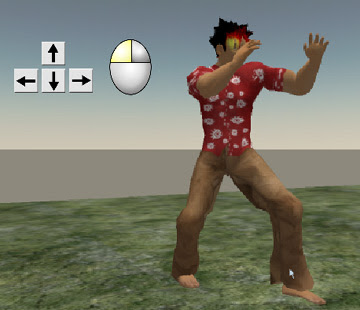
In DCS, players attack theiar target by pushing the arrow key (or, AWSD key) while pushing the left button of the mouse.

If a timing and distance are appropriate, the player can give a target damage.

The player generally puts on the weapons such as a sword or the crow to fight in DCS.In karate weapon which I produced, players attach the bracelet-shaped object, but they do not put on the weapon and attack the target barehanded.

_/_/_/ How to use [Karate Fight for DCS] _/_/_/

(1)Rez the object "Karate_Fight_for_DCS_box" on the ground of sand box or your land.
(2)Right click it and open the content.
(3)Put the "Karate_Fight_for_DCS1.0" in the inventory.
(4)Drag and drop the "Karate_Fight_for_DCS1.0" to attach your avator.A bracelet-shaped object is attached to the right arm of the avatar.
(5)You can attack the target by pushing the arrow button while pushing the left button of the mouse.※ If an owner clicks it, the bracelet-shaped object will be invisible. And 2nd click make it appear.
_/_/_/ The operation of the karate skills with arrow keys _/_/_/

With pushing the left button of the mouse, operate arrow key as follows.
() is the key which you can substitute for arrow key.

arrow keyLeft(A) ===== Left Front Kick
Right(D)===== Right Front Kick
Forward(W)=== Punch Left,Right,Left High Kick
Back(S) ===== Jumping Backspin Kick
Forward(W) + Back(S) ===== Punch Left,Right,Backspin Chop, Axe Kick
Forward(W) + Left(A) ===== Left High Kick
Forward(W) + Right(D) ===== Right High Kick
Left(A) + Right(D) ===== Left High Kick,Right Reverse Roundhouse Kick
Back(S) + Left(A) ===== Right Reverse Roundhouse Kick
Back(S) + Right(D) ===== Right High Kick,Right Jumping High Kick


_/_/_/ The change of animation assigned to arrow key _/_/_/

(1)Rez the bracelet-shaped object," Karate_Fight_for_DCS1.0 on the ground of sand box or your land.Right click it and open the content, move the animation file which you do not use to your inventory.

(2)Put the new animation file into "contents", and change the file name to the one which moved to your inventory at (1).(You had better to write the original name of the animation file in the "description" field of property panel)

(3)After replacing, return "Karate_Fight_for_DCS1.0" to your inventory, and attach it by drag & drop.

* All animation files sold in my shop "Brave Stream" are Modify OK, so you can use them to replace.

_/_/_/ The change of sound assigned to arrow key _/_/_/

Like a case to replace animation files, replace the sound file and change the file name.

_/_/_/ Permissions of each elements of this weapon _/_/_/

animation === Modify OK, Transfer OK
sound === Modify OK, Transfer OK (2009/05/30 changed)
object === Modify OK, Transfer OK
script === Transfer OK

Please try it !

Saturday, February 9, 2008

About DCS

Hi, a Karate weapon for DCS was finally completed.

I will show it soon, and I will make a new shop only for DCS users.
Because it seems to cause confusion when I put the tools of the different use in the same place.

DCS users, expect it and please wait.

By the way, I write about DCS today.
At first, it was an opportunity that DCS was introduced by an American man.
He said to me."You should make the Karate weapon for DCS"
I asked him."What is DCS ?"
He gave me teleport.

This plase was "DARK CITY", SIM for DCS.
I knew "DCS" means "Dynamic Combat System".
The combat in "DARK CITY" was very exciting. And I made up my mind to make an karate weapon for DCS.

In DCS, members use the HUD that display numerical value such as health or the stamina.And values(strength ,concentration, etc.) also forms a line in the screen upper part.

I heard that SIMs for DCS are over 30, and over 5,000 peaple play there.
DCS is not only combat system but also RPG system.So, they do not always fight, usually enjoying role playing.

To start DCS, we should go to Resource Center of DCS.Jarang (143, 213, 377)

Signboards of SIM for "DCS" are displayed there.

HUD or weapons of "the DCS" are sold over there.

It is a 1st step to get them to start DCS.

I went to the "Roman Empire"SIM. The Roman Empire (5, 127, 30)Because I who liked the history was interested in the SIM.

I picked a quarrel recklessly.

I have been ruined by a sword a lot.
My health became only 16%.

It is very difficult to win the battle in DCS.

Monday, January 28, 2008

Priority and Permission

Hi, I'm now making Karate weapon for DCS.

Yesterday, I edited my all karate animations those are sold at shops in SL, and in SLEX and shop OnRez.

I changed
1, I made the priority of all animattions "4".
2, I made the permission of all animattions "modify OK".

You know, we should configure the priority of animation when we upload BVH file.
Sometimes I have set it 3, because there are no problems to enjoy only watching animations.
but recently, many peaple purchase my Karate animations to make weapons for combat.

In many combat sysytems, player uses arrow buttons for avator's motion.
At this time, if the priority of Karate animation is low, walking motion delete the Karate animation.

So, I changed the priority "4".

And to make weapon with Karate animations, they want to change the file name.
So, I made the "modify" permission OK.

I think that the karate animations became the convenient materials to make a weapon.

Thursday, January 10, 2008

We can understand if talk with.

Hi, recently I have got a lot of IM from the people who are not Japanese.
Needless to say, they chat in English.

I usually read them when they are not in SL, because there is difference in time.
Because I am troublesome, I ignored them in a beginning, but recently I intend to challenge to reply and talk.

For about a month I have talked with various foreigners.
And I knew that I tend to profit by the conversation , though it began with a very simple IM.
I am poor at English, but after chatting hard,I can see the thing which the partner wants.
When I prepare it after a few hours, the partner often purchases it with thanking me.

Many peaple often say " you should enjoy second life as community ".
But I have thought to enjoy only selling my animations because my English is limited.

But nealy I communicate many foreigners, I feel that fun of the second life is to communicate with persons of the different culture.

Saturday, December 29, 2007

Motion Plug Complete type A

Hi, how are you?

I started sale of HUD "Motion Plug Complete type A" that is the "Motion Plug" preinstalled karate animations.


Having distributed the "Motion Plug" free, animations are other selling, so users can set their favorite animations.

But some people says that "I want a HUD that has been completed settings".
So, I released this version.
[Motion Plug Complete type A] is a HUD that can control real Karate animations by 1click.[Motion Plug Complete type A] includes 17 animations and 3poses of karate, and the assignment to the buttons has been already finished.
So, you can use it after drag and drop to your avator.

"type A" means the type of lineup of karate animations.Now(Dec,2007),there is only "type A", but I will release new types in the future.

I am happy if I have you enjoy [Motion Plug Complete type A]

//// sale places ////

**** Second Life Exchange ****
http://www.slexchange.com/modules.php?name=Marketplace&file=item&ItemID=485274

**** ShopOnRez ****
http://shop.onrez.com/item/457494

※ I am going to sell it from tomorrow in each shop in SL.


//// How to use [Motion Plug Complete type A] ////

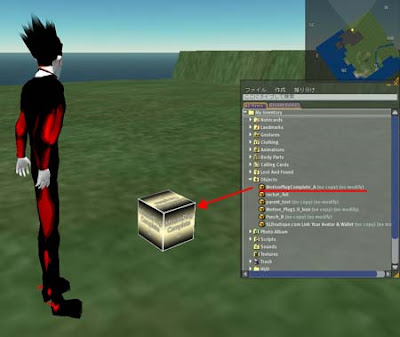
(1)Rez the object "MP_Comp_A_box" on the ground of sand box or your land.


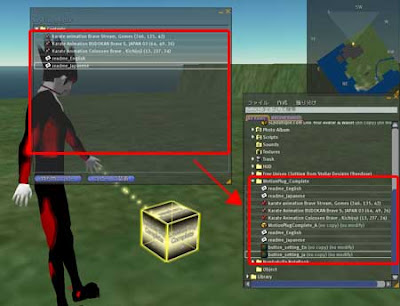
(2)Right click it and open the content.

(3)Put the "MotionPlugComplete_A" and other contents in the avator's inventory.

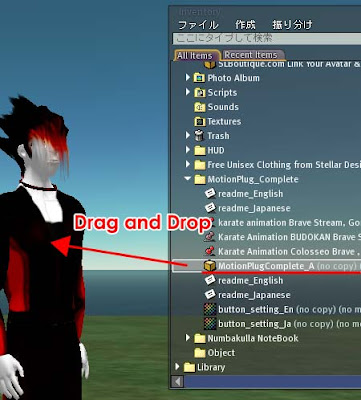
(4)Drag and drop the "MotionPlugComplete_A" to attach your avator.
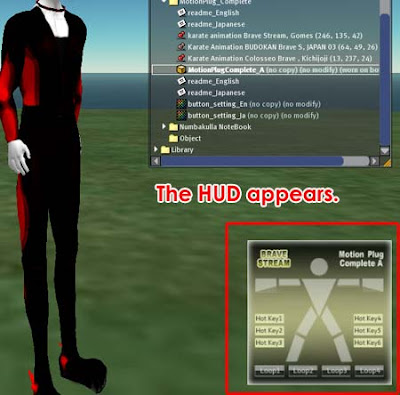

(5)Click buttons of the HUD that is in the lower right area, and please play animations.
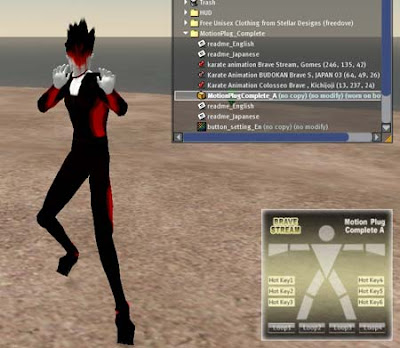
* 4 "Loop" buttons are for loop animations. The 1st click can play loop animation and 2nd click can stop it.
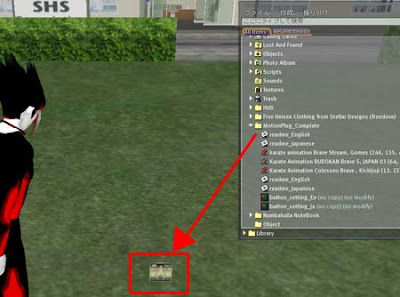
Preparations were completed!  Isn't it easy?

//// The list of assignment to buttons ////

About the assignment of animations to buttons, please confirm the image "button_setting_En" which is in "MP_Comp_A_box".


*The information next here is about the change of animations to assign buttons. So,if you donnot want to change them, you don't have to read below.

//// If you want to change the assignment to buttons ////
(1)Rez the "MotionPlugComplete_A" from your inventory to the ground.

(2)Right click the "MotionPlugComplete_A" and open the Content tab in the Edit menu, drag and drop all animations that you want to use into Content.
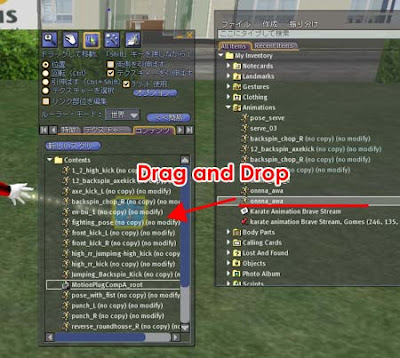
(3)Double click the script "MotionPlugCompA_root" in the same Content.
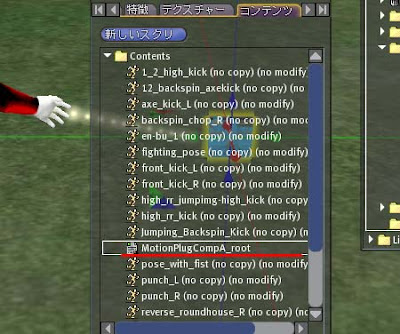
(4)You assign animations to a button in the list below the title //// Assign animations to buttons,here ///.
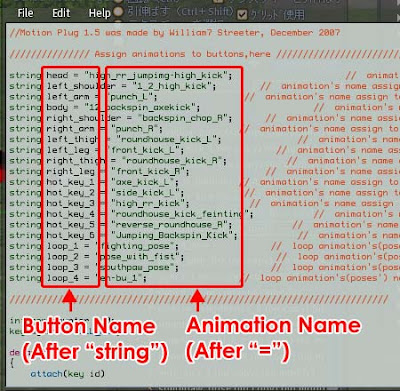
For example,in the case of the first line 'string head = "high_rr_jumpimg-high_kick"; ' , please change "high_rr_jumpimg-high_kick" to the name of the new animation you want to use.

* Right-click the animation , property screen will open, select the name text , copy to the script, it's the simple way.

Because character string "head" after "string" is the button name, you assign the new animation to a head button in this line.


* Put animations that are not loop animation into body parts button and hotkey button.(These buttons do't have the function to stop the loop animations)
* Put loop animations(and poses) into the "Loop" buttons.("Loop" buttons have a function to stop the loop animations by second click.)

(5)When you finish writing the names of animations and save the script,close the edit menu and take "MotionPlugComplete_A" in your inventory.

That's all.


//// Attention ////

(1) [ Motion Plug Complete type A ] cannot give damege to another avators and objects.
(2)*This HUD cannot work at the place where the use of the script is set impossible.

//// Group ////
I established a group to send update information from "Brave Stream".
Please search the group with keyword "Brave Stream English",and push the "Join" button.

Tuesday, December 18, 2007

The Number of Residents Logged-In

Hi, it's very cold, is't it?
But in SL, it's very hot before X'mas.

Total Residents of SL increased 11,476,426 ,today.
But they say that there are many people who log in only 1time, because they cannot find what to do.
So, I have been interested in the change of the number of Residents Logged-In.
At this page we can see the numbers of "Residents Logged-In During Last 7,14,30,60 Days".
(I think numbers will be ones of unique users)

But I could not find the graph of the change of them.
(If you know about it, please teach me.)

I have begun to write down numbers of "Population" of the page in Excel from the latter half of September.
*I think the points falling greatly are influence of maintenance in SL.

Seeing it, numbers increase from the latter half of October to November, but become about the same with numerical value three months ago when December begins.

Because the age group of most users seems to be 30 generations, the number of the login may fall in the time when work is busy.

Total Residents ;
07/09/24 ; 9,686,1
07/12/18; 11,457,044
They increase by about 18%.

This increase rate should be just reflected to the number of the login.
Well, almost people may be so busy now.

Thursday, December 13, 2007

Sculpted Prim by LightWave3D (2nd)

Today,Iexplain about sculpted prim made by LightWave3D.
A finished product is the lights tower in the image below.
I like the shadow chopped in structure very much.
I looks photograph-like, but it is not a photograph.

At first, , make an object by LightWave, and set surface by node editer that was added from LW9.0.

After the appearance became good feeling, render it by "surface baking camera".


Then the following texture was made.


Next, render the sculpt image by using the plugin of LW.
It is easy to make this, because the work can be done immediately after making surface.

Well, look at the step before rendaring.
The most important thing to make sculpt prim is editting a UV map adequately.

By default, the UV map of this object is below.
Seemingly I seem to be orderly, but there is a protruding part.
In addition, it is hard to find it, but, the top and base round surfaces are in linearity state at top and the base of the map.

Widen these and edit it, not to protrude ,not to have blanks.
At last, make it a triangle polygon by Ctrl+T.

Notice, making triangle polygon is the last work, because edittig becaome defficult after it.

Aftre them, the final map is below.
I do not think this is perfect, but think that the point where I minded was not wrong because I was able to make the shape that I thought.